Decode Morse hidden in noisy audio
Open the Morse code audio decoder to follow these steps. For a video or screen recording, use the video Morse code translator.
1. Open the recording
Choose a file you have permission to use. Audio and video are processed on your device. For a website video, make your own permitted recording or use tab audio capture in a supported browser. We do not download YouTube videos.
2. Find the intermittent horizontal line
Morse usually appears as a horizontal row of short and long bright marks. Music may produce brighter, continuous lines. Click the intermittent line to lock its pitch. This changes the settings; press Decode selection when you are ready.
3. Choose a short, clear passage
Drag across the waveform or enter start and end times in seconds. Include a small quiet margin at both ends. Avoid cutting through a dot or dash. Decode again and compare the result.
4. Verify the characters
Click a character to inspect its marks. If an observed audio interval is available, you can replay it. Results without character timing, including deep decoding output, cannot be replayed character by character; use Play selection to check the original passage, or switch to the signal timing result to inspect available intervals. Candidate letters are similar code shapes, not probability estimates. Type a correction if needed. Unknown confidence means that the engine has not supplied a calibrated score; it does not mean the result is certain.
Observed Morse is inferred from the audio signal. Re-encoded Morse is generated from text, such as a manual correction, and is labelled separately.
5. Copy or share
Copy text, copy Morse or download TXT. A result link includes only text and Morse in its fragment. It does not include the recording. Anyone with the link can read that text, so avoid sharing private material.
If it still does not decode
Try a different pitch or a longer passage. Very slow signals, multiple overlapping transmissions, speech and heavy distortion remain difficult. Do not use an unverified transcript for emergency or operational decisions.
A spectrum from the actual tool
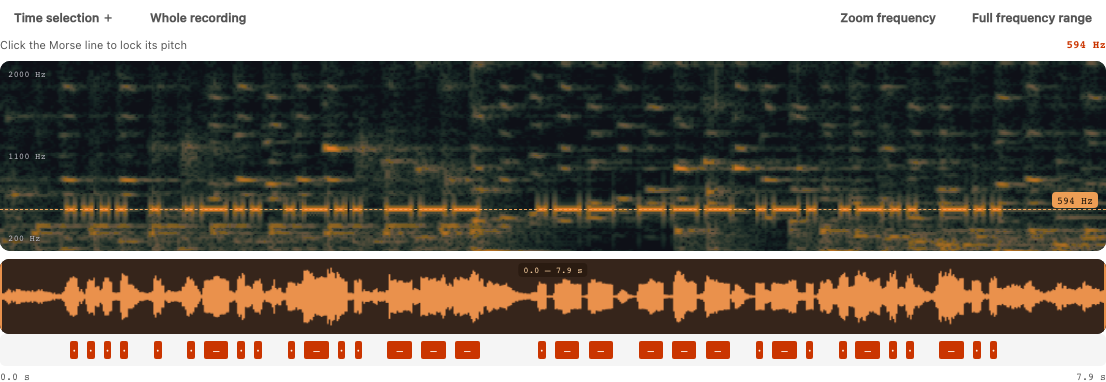
The horizontal pulses near 600 Hz are the synthesized Morse tone. Click that line to lock the frequency, then drag over a short passage in the waveform. Use the zoom controls when two tones are close together. The orange marks below the waveform come from measured signal segments; they are an interpretation, not calibrated confidence or a neural alignment.
This screenshot uses a cropped excerpt of “Monkeys Spinning Monkeys” by Kevin MacLeod, CC BY 4.0, mixed with a synthesized Morse tone. It is a demonstration, not a real-recording accuracy test.